Android Preview 1.36 · versionCode 38
Home
Check this week’s information and open bulletins, announcements and articles.
Tap a manual illustration to open it in a new tab; use your browser’s zoom to inspect details.
These are Android screens. Labels may differ with the selected language or available content; change the app language in Settings.
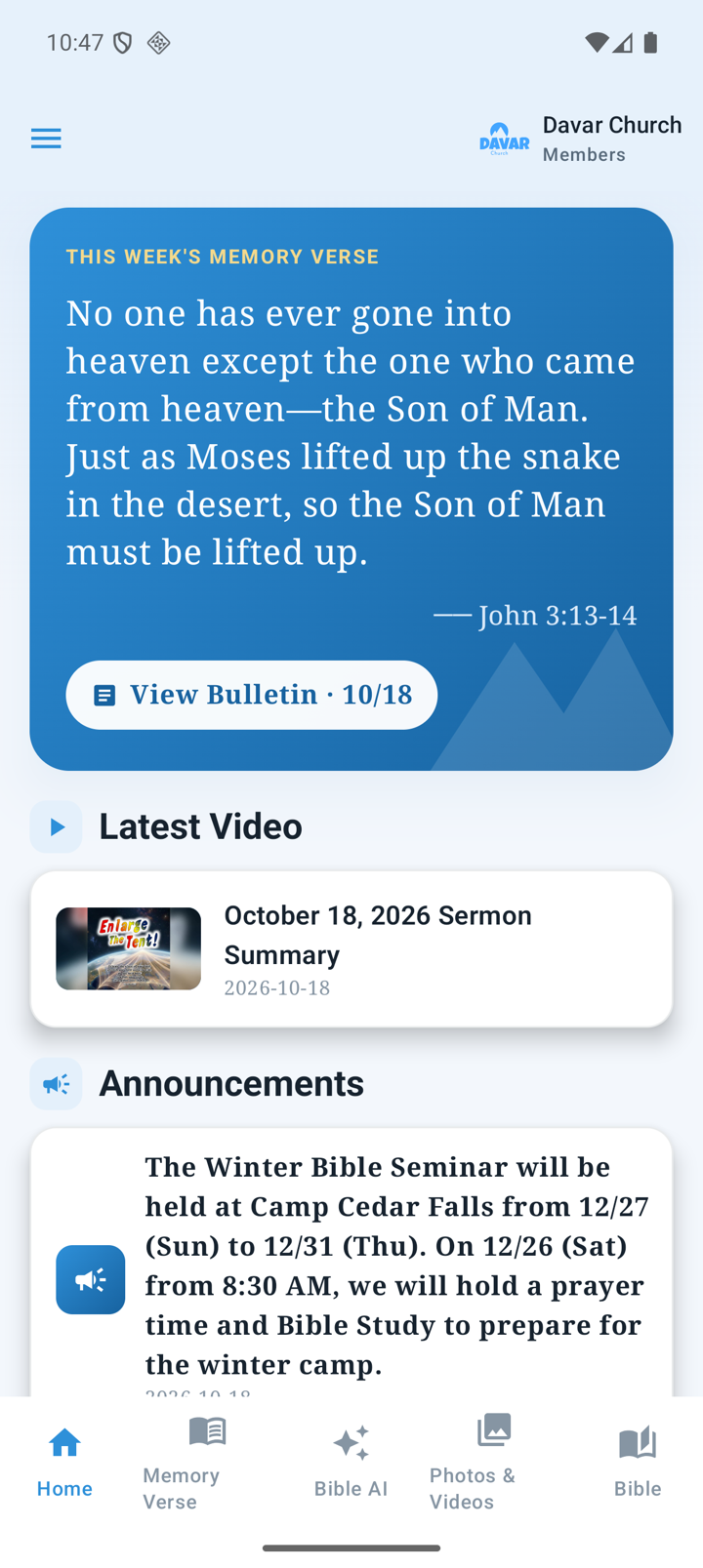
Open current information
- Open Home and pull down to refresh when needed.
- Tap the weekly verse, latest video, announcement, bulletin or newsletter card you want.
- Upcoming Events opens official calendar information.
- An offline notice means saved content is being shown. Refresh again after reconnecting.
Read and share the bulletin
- Tap View Bulletin to open the in-app PDF reader.
- Move between pages and zoom. Two-spread bulletins are arranged as four portrait reading pages.
- Where Show selectable text is available, select/copy text and use supported translation or read-aloud controls.
- Sharing uses the original PDF. If loading fails, check the connection and retry.
Read Youth articles with their photographs
- Open a supported HTML newsletter article.
- Use Translate for Japanese/English text while keeping the photographs and article layout.
- Use Original to restore the source text; Read aloud speaks the text currently displayed.
- Share sends the original article link. Reload loads the article again and clears its previous translation.
Translation shows progress and cancellation. On-device translation may require a language-model download, and speech uses the voices available on your device.
See the next chapter for full notices, email actions and order destinations.