Android Preview 1.36 · versionCode 38
Android illustrated manual
Learn Android Preview 1.36 with real screens and numbered steps, from everyday reading to posting and management with the required permissions.
Tap a manual illustration to open it in a new tab; use your browser’s zoom to inspect details.
These are Android screens. Labels may differ with the selected language or available content; change the app language in Settings.
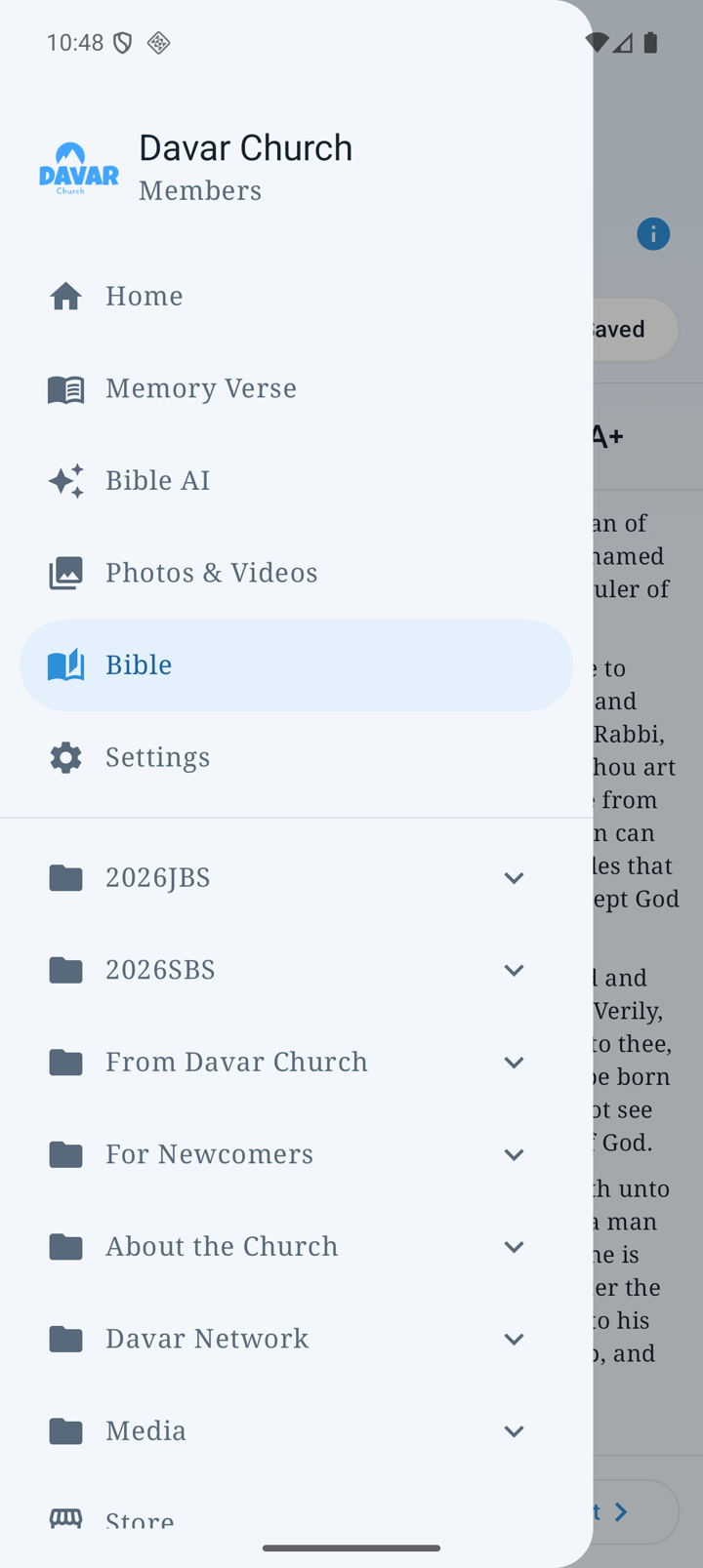
Start here
- Open the three-line menu at the upper left and choose a feature.
- The five bottom tabs are Home, Memory Verse, Bible AI, Photos & Videos and Bible. Open Settings from the menu.
- Return with Android Back or the app’s Back/Close control.
- Pull a list down to refresh. The Bible reader hides the bottom bar to leave room for reading; use the top menu to go elsewhere.
Choose a feature
Installation, updates and these illustrations
Install the APK from the official Android Beta page; it is not a Google Play release. Update over the existing app rather than uninstalling it.
The basic screens are from signed Android 1.36. Some rich-notice, order and dictionary illustrations are clearly labelled test examples, not records of real notices or orders. Bible AI and Photos & Videos also show their real signed-out screens.
Physical Android Push verification and a tablet-specific layout remain outstanding. See platform differences.